

Hotkey HQ
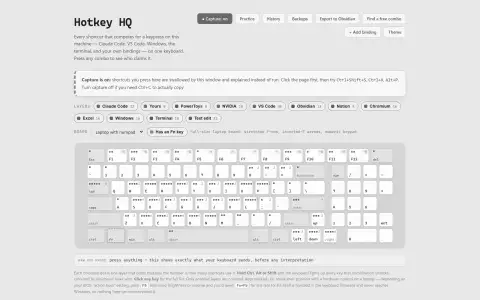
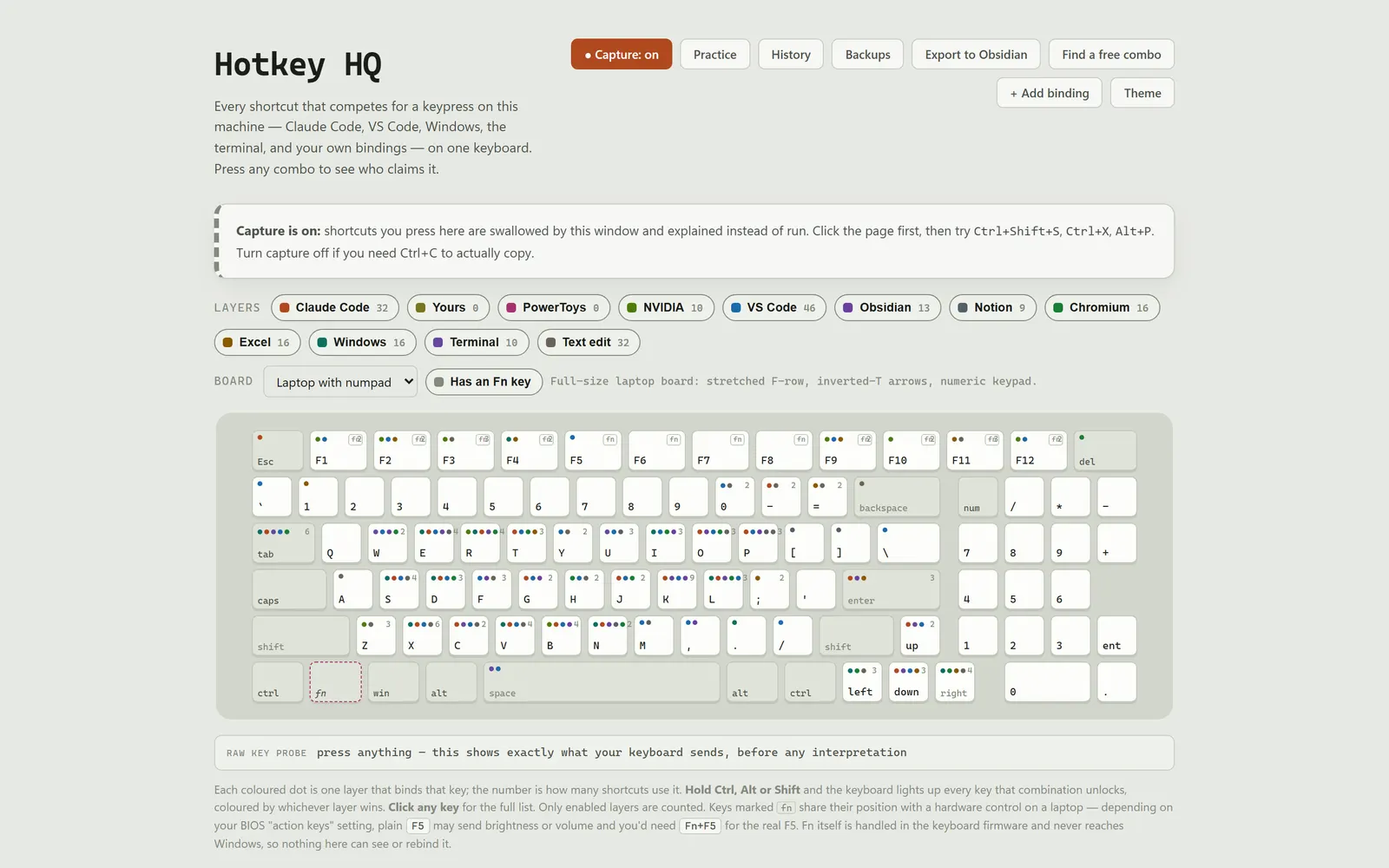
Shows the configured and default shortcuts on your Windows PC on one keyboard, so you can see which bindings claim a key.
The problem
When a Windows shortcut stopped working, the binding could belong to the OS, Claude Code, VS Code, PowerToys, Terminal or the focused app, and answering “who is eating this key?” meant searching several settings files. Global hooks made the result less obvious because PowerToys or NVIDIA could win before the focused app saw the key.
What it does
Configured and default shortcut layers for Claude Code, VS Code, Windows, PowerToys and Windows Terminal on one keyboard view.
It answers the question you actually have when a shortcut misbehaves, rather than making you grep six settings files. Runs as its own desktop window off one dependency.
Who it is for
Windows power users and developers whose shortcuts clash across apps.
What it does, feature by feature
- Press to identify. Capture supported shortcuts while the window has focus and see matches in configured and default layers.
- Hold a modifier. Hold Ctrl, Alt or Shift and every combination it unlocks lights up, coloured by app.
- Reads your real setup. Claude Code, VS Code, PowerToys and Windows Terminal settings, read live.
- Find a free combo. Lists combinations unused in the configured and default layers.
- Assign and remove. Change Claude Code and VS Code shortcuts from the app, with backups.
- Fix conflicts. Flags and resolves PowerToys modules that override app shortcuts.
- Cheat sheets. Export your shortcuts to an Obsidian note.
- Your keyboard. Laptop with or without a numpad, tenkeyless or 65%.
- Private and safe. Runs locally, refuses requests from websites, and never installs a keylogger-style hook.
Why it is built this way
I read the running user's configuration live and put every claimant on one pressable keyboard, with defaults explicitly versioned when they have to be hand-maintained. The app stays local and refuses cross-origin requests with a per-run token; it also refuses the tempting low-level global hook because capturing every keystroke like a keylogger is not a reasonable trade for a reference tool.
What was hard
PowerToys stores vendor defaults and user overrides under labels that collapse to the same name, so the resolver had to keep separate maps, write the override slot and restart PowerToys before the old binding actually stopped firing. Obsidian created the opposite problem: it persists only overrides, so a complete layer had to combine a defaults table with live vault settings.
What it ships with
- One keyboard, configured and default layers
- Press-to-identify
- Open source