Typing Speed Overlay: Live WPM over Any App
I built Typing Speed Overlay to show my live typing speed in a small box over the app I am using. It changes colour as I speed up, stays out of the way, and never logs keys or what I type.
The problem
I wanted to see my typing speed while using my usual apps, without opening a separate typing test or a statistics window. A small floating number is enough.
What it does
- Shows words per minute in an always-on-top window that you can drag into place.
- Uses a five-second average, refreshed once a second.
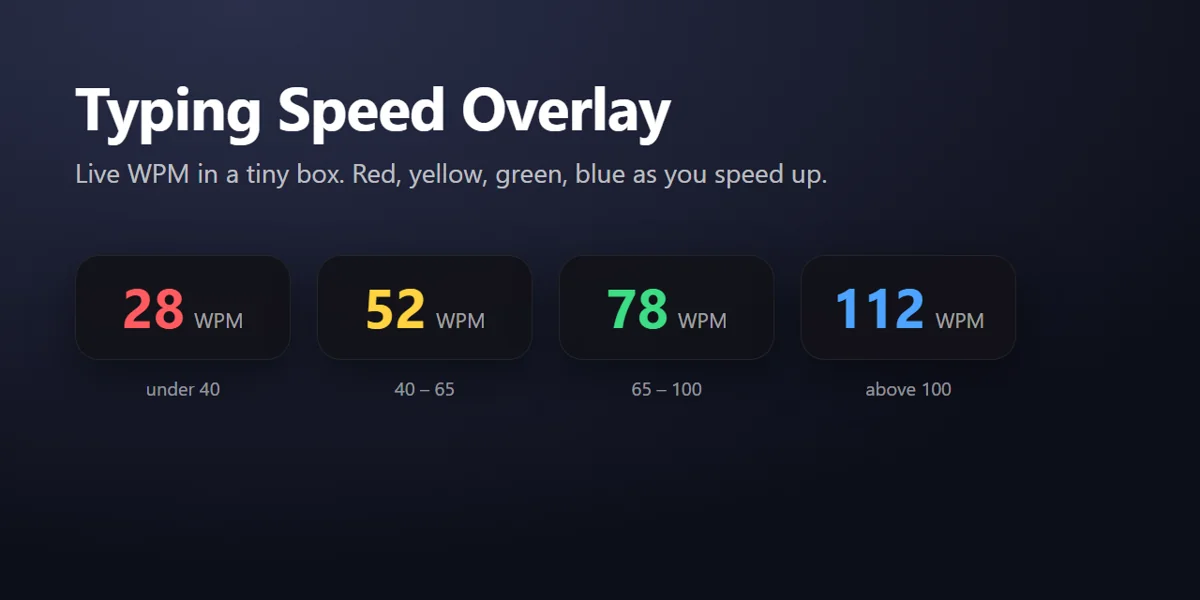
- Changes from red to yellow, green and blue as typing speed increases.
- Offers tray controls to hide or show the overlay, pause counting or quit.
- Shows a close button on hover and only runs when you open it.
- Never logs keys or typed text, and has no network access.
How it works
The overlay keeps key-press timing for five seconds to calculate speed, without storing which keys you press or what you type. Net WPM is typed characters minus backspaces, divided by five and then by elapsed minutes. Letters, digits, spaces and punctuation count; shortcuts, arrows and function keys do not.
The colour bands are red below 40 WPM, yellow from 40 to 65, green from 65 to 100 and blue above 100. These are speed indicators, not an accuracy score.
Get started
Download v0.1.0
Get the v0.1.0 release: an installer or portable executable for Windows, a DMG for macOS on Apple silicon, or an AppImage or Debian package for Linux.
Check the unsigned-build notice
The builds are not code-signed. Windows SmartScreen may show an unknown publisher warning; the README describes More info, then Run anyway. On macOS, the README describes right-clicking the app, choosing Open and confirming. Review the source and release before deciding to run an unsigned download.
Open and position the overlay
Drag the box where you want it. Use the tray icon to hide it, pause counting or quit.
Platform notes
- Windows: keys typed in administrator apps are only visible if the overlay also runs as administrator.
- macOS: grant Accessibility / Input Monitoring permission. The release build is for Apple silicon; Intel Macs need to run from source.
- Linux: global key listening needs X11 or XWayland; a Wayland-only session blocks it.
To run from the repository source:
git clone https://github.com/ddivyanshsharmaa/typing-speed-overlay
cd typing-speed-overlay
npm install
npm start
Questions
Does it log keys or record what I type?
No. It keeps only key-press timing for five seconds, never which key or what you type, and has no network access.
Which platforms have v0.1.0 downloads?
Windows has installer and portable builds, macOS has an Apple silicon DMG, and Linux has AppImage and Debian packages. Intel Macs need to run from source.
Are the downloads code-signed?
No. The builds are unsigned. Windows may show an unknown publisher warning, and macOS requires the first-run Open confirmation described in the README.
How often does the speed update?
Once a second, using an average over the last five seconds.
Does it start automatically?
No. It only runs when you open it. The tray icon lets you hide it, pause counting or quit.