clispare: Coding CLI Accounts and Failover
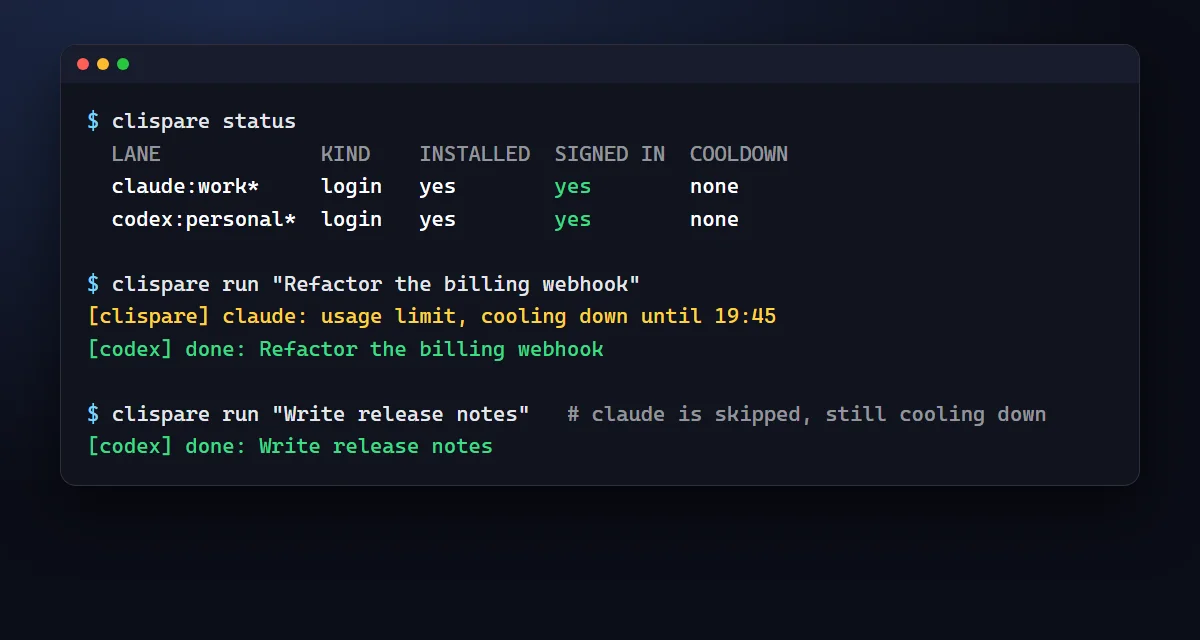
I built clispare to keep my coding CLI logins in one place and move a job to a different engine when one hits a usage limit. It runs the tools I already have installed, remembers cooldowns, and keeps account switching in one command-line tool.
The problem
Each coding CLI has its own login, limits and errors. When one reaches a usage limit during a task, switching tools by hand interrupts the work. I wanted one account list and a command that could try the next engine.
What it does
- Keeps multiple services and accounts in one list, with an optional email or ID to tell them apart.
- Shows which tools are installed, signed in or cooling down.
- Runs headless jobs through Claude Code, Codex, Grok, Antigravity (agy) and API-key services.
- Moves to a different service after a usage limit or sign-in problem, and retries a temporary error once before moving on.
- Stops on a task failure rather than repeating the same failing task across every engine.
- Runs without dependencies, a daemon or telemetry.
How it works
clispare run starts the real CLI or sends an API request to the selected provider. It classifies the result as success, a limit, an authentication error, a temporary error or a task failure. Saved cooldowns let the next run skip a service that is still limited.
By default, it uses one account per service and fails over to a different service. Optional account rotation is off by default; using it to get past a provider limit may break that provider's terms and put accounts at risk.
Get started
Install
npm install -g clispare
clispare --help
Requires Node.js 18 or newer. Or run it without installing:
npx clispare status.Add accounts and check status
clispare add
clispare status
Follow the sign-in prompts. Type
donewhen you have finished adding accounts.Run a task
clispare run "Refactor the billing webhook to use idempotency keys"The real CLIs need to be installed and signed in, or you can choose an API-key service. Providers bill API use to your account.
Privacy and security
API keys stay in local files under ~/.clispare. They are never printed, logged or written into the account list or cooldown state. On Unix, key files use mode 0600; Windows file permissions are best effort, so keep your user folder private.
clispare removes stray provider credential variables before starting a real CLI. It has no telemetry or background server. API requests go to the provider you choose. Report security problems through a private GitHub security advisory.
Known limits
This is version 0.1.0. Limit-message patterns have been tested with stub engines, not real provider errors. API endpoints and default models can go stale. New profile folders do not inherit settings or skills, and clispare cannot change accounts inside a running interactive session.
Testing so far is on Windows only; macOS Keychain behaviour is unverified. Some first-run services can be listed as accounts but are skipped by run. Read the README limitations before relying on failover.
Questions
Is clispare on npm?
Yes. Install it with npm install -g clispare, or try it with npx clispare status. It requires Node.js 18 or newer.
Does it switch between accounts of the same provider automatically?
Not by default. It selects one account per service and fails over to a different service. Optional account rotation is off by default and may break provider terms.
Have real provider usage-limit messages been verified?
No. The patterns have been tested with stub engines. Real usage-limit messages still need testing and tuning.
Is it a proxy or a background service?
No. It starts the real CLIs and makes plain API requests one at a time, with no background server.
Where are my account data and keys?
They stay under ~/.clispare on your machine. Keys are stored separately from the account list and cooldown state, and are never printed or logged.